ContentFlash AI vs Google Forms
Google Forms is free and familiar — but is it good enough for professional use? Compare AI-powered form building vs Google's basic approach.
Quick Verdict
Google Forms is ideal for quick internal surveys and simple data collection where design doesn't matter. ContentFlash AI is the clear winner for professional, client-facing forms that need to look polished, branded, and protected from spam — plus you get AI-powered generation that saves significant time.
Speed Comparison
ContentFlash AI
~10 sec
Describe → Done
Google Forms
~15 min
Add each question manually
AI form generation is 90x faster than manual building
Feature-by-Feature Comparison
| Feature | ContentFlash AI | Google Forms |
|---|---|---|
| AI Form Generation | Yes — describe & generate | No |
| Price | Free tier + affordable premium | 100% free |
| Form Design Quality | Professional themes | Basic / generic look |
| Custom Branding | Yes (premium) | Very limited |
| Themes | 3 professional themes | Color header only |
| reCAPTCHA / Spam Protection | Built-in reCAPTCHA | Basic filtering only |
| Email Notifications | Included free | Via Google Sheets add-ons |
| Embeddable Forms | Yes — any website | Yes — with Google styling |
| Conditional Logic | AI-powered smart fields | Basic section branching |
| File Uploads | On premium plans | Free (Google Drive) |
| Setup Time | ~30 seconds with AI | 5-20 minutes manual |
| Response Storage | Secure cloud storage | Google Sheets integration |
| Offline Support | Online only | Limited offline support |
| Additional AI Tools | Full AI content suite | None |
Why Choose ContentFlash AI Over Google Forms
Professional Design Quality
Google Forms has an instantly recognizable "Google Form" look that can appear unprofessional for client-facing use. ContentFlash AI offers polished themes with custom colors and fonts that match your brand identity.
AI Creates Forms Instantly
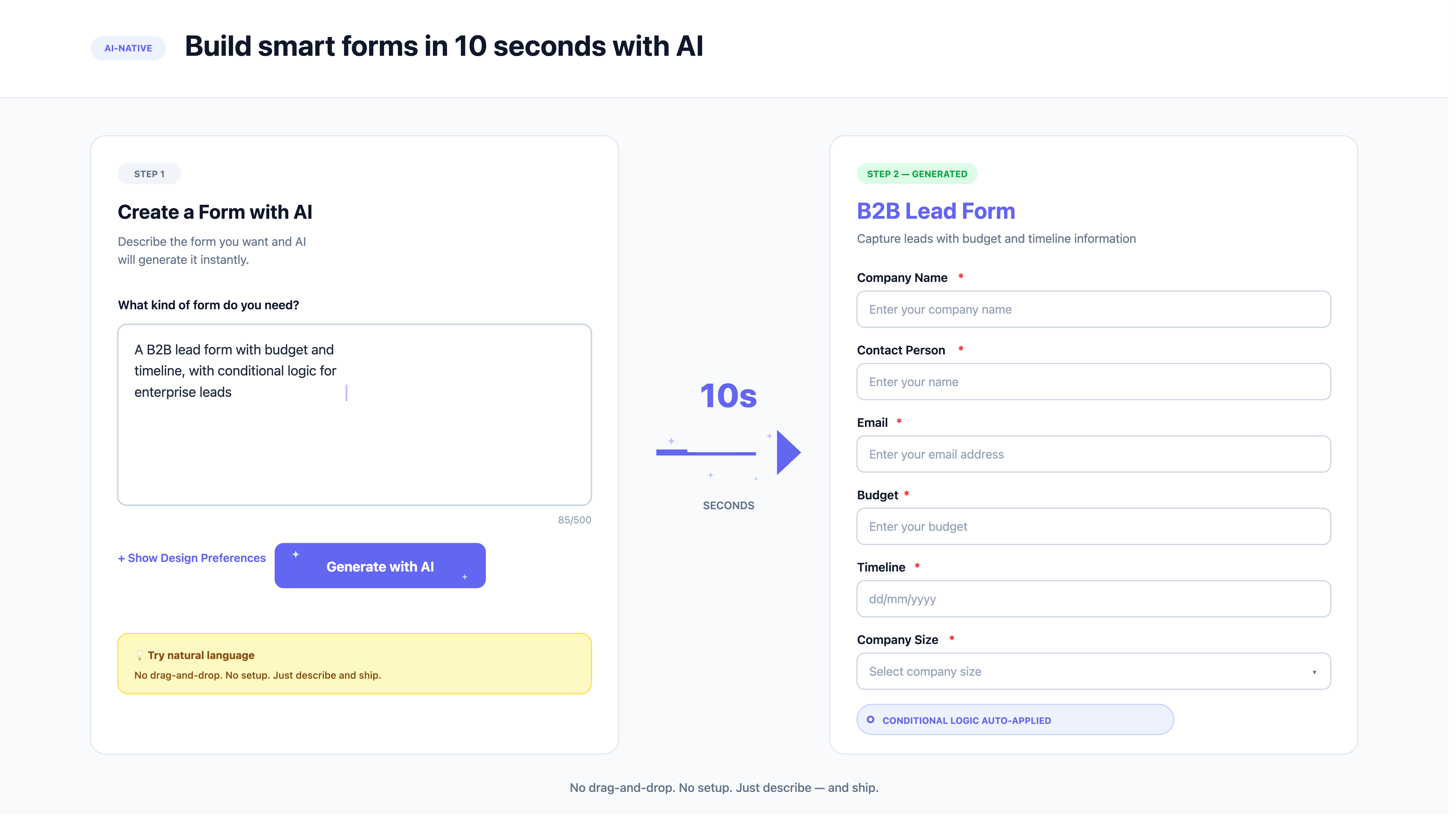
Skip the manual question-by-question setup. Describe "a customer feedback form with rating, comments, and email" and ContentFlash AI generates the entire form with proper field types and validation in seconds.
Real Spam Protection
Google Forms has basic spam filtering that often lets through junk responses. ContentFlash AI includes proper Google reCAPTCHA integration that effectively blocks bots and spam submissions.
Better Embeds
Google Forms embeds look out of place on most websites with their Google styling. ContentFlash AI embeds blend seamlessly with your site design, maintaining a consistent brand experience.
See It in Action — Try the AI Form Builder
Describe any form and watch AI build it instantly. No signup needed.
AI Form Builder
Describe the form you need and AI will build it instantly
Powered by Content Flash AI
No credit card required. Create unlimited forms with a free account.
When Google Forms Might Be the Better Choice
Google Forms has clear advantages in certain situations:
- • 100% free forever: Google Forms is completely free with unlimited forms, responses, and storage via Google Drive. No paid tiers at all.
- • Google Sheets integration: Responses automatically flow into Google Sheets, which is incredibly useful for data analysis and team collaboration.
- • Internal team use: For internal surveys, polls, and data collection where design doesn't matter, Google Forms is perfectly adequate and widely familiar.
- • Google Workspace users: If your organization uses Google Workspace, Forms integrates seamlessly with your existing tools.
But for anything customer-facing, branded, or professional — contact forms on your website, lead generation, client surveys — ContentFlash AI delivers a vastly superior experience.
Pricing Comparison
ContentFlash AI
- ✓ AI form generation
- ✓ Professional themes
- ✓ Custom branding (premium)
- ✓ Built-in reCAPTCHA
- ✓ Email notifications
- ✓ Full AI content suite
Google Forms
- ✗ No AI generation
- ✗ Basic / generic design
- ✗ No custom branding
- ~ Basic spam filtering only
- ~ Via add-ons only
- ✗ No additional tools
Upgrade from Google Forms
Get professional forms with AI generation. Tell us what you need.
ContentFlash AI vs Google Forms: Why It's Time to Upgrade
Google Forms is the world's most widely used form builder. It's free, it's familiar, and it works with the Google ecosystem millions of people already use. For a quick internal poll or a simple class survey, it gets the job done. But when it comes to professional, business-grade forms, Google Forms falls short in almost every category.
The most obvious limitation is design. Google Forms has a recognizable look that immediately signals "this is a Google Form." You can change the header color and add an image, but that's about it. There are no themes, no custom fonts, no branded styling. For businesses that care about their brand image — and you should — this is a dealbreaker for any customer-facing form.
The AI Advantage
ContentFlash AI solves both the design and speed problems simultaneously. Its AI form generation understands natural language descriptions and creates complete, professionally styled forms in seconds. You get proper field types, validation, and a polished look without spending time on manual configuration.
Consider the typical workflow: In Google Forms, you create a new form, type a title, add each question one by one, select field types, configure required fields, adjust settings, and hope the result looks decent. In ContentFlash AI, you type "create a customer feedback form with name, email, satisfaction rating, and comments" — and you are done. The AI handles everything else.
The Right Tool for the Right Job
There is no shame in using Google Forms for internal needs. It is excellent for quick team surveys, classroom assignments, and simple data collection. But the moment you need forms that represent your brand professionally — contact forms on your website, lead generation forms, client surveys, event registrations — ContentFlash AI delivers a dramatically better result in a fraction of the time.